
Who This Is For
- Traders who understand bots and are preparing an actual setup checklist.
- Existing users checking account selection, order handling, or reconnect behavior.
Futures automation guide
Prepare automated futures trading with checks for account permissions, demo testing, strategy settings, protective orders, and monitoring after setup.

Broker connection illustration, not a connected account or a trading result.
What You Will Learn
Once you understand what a futures bot does, the next question is whether the entire setup behaves as intended. Buying access, authenticating a broker, selecting an account, and enabling a strategy are different events. This checklist is for that operational stage—not another list of reasons to buy a bot. Record what you checked and what remains uncertain before you rely on automated execution.
Looking for a different step? New to bots? Start with the concepts guide →
Work through these checks in order. The examples explain a process; they are not instructions to place a trade.
Check that your plan includes the software and that the specific brokerage or prop-firm account permits its use. Confirm the provider's required environment and permissions. Do not assume the words evaluation, funded, or live map consistently across firms. Follow the setup flow for the supported connection you actually use.
After authorization, compare the returned account identifier with your intended account. Check the strategy, instrument, contract count, and enabled state. A successful login is not proof of a correct configuration. Keep execution setup separate from reporting-only Journal and Prop Guard connections.
Where supported, use a simulation environment to inspect an entry, protective orders, and the eventual exit. Reconcile the broker's fills and remaining working orders with the dashboard. A chart marker is not an execution confirmation. If no strategy setup qualifies, verify the state without forcing a manual order.
Know how to stop new entries, how to check existing positions, and who to contact if the dashboard disagrees with the broker. If authorization expires, reconnect using the normal secure flow, then recheck account state before resuming. Do not treat repeatedly reconnecting or resubmitting instructions as a substitute for determining whether an order already exists.
A successful setup test is not evidence of profitability. Check costs, losses, remaining drawdown, contract limits, and any required flat time against the relevant account rules. Recheck after a plan or account change; a technical connection does not automatically enforce every provider restriction.
A login succeeds but the intended account is absent. Compare the selected environment and the provider's account assignment before changing credentials or assuming access is broken. A similarly named account in another environment is not an interchangeable destination.
Turning off future entries and closing an existing position are different actions. Check the product's behavior and verify open positions and working orders at the broker. Never infer that an account is flat solely because an enable switch is off.
If a dashboard appears empty after reconnecting, the broker may still have an open position or working order. Establish the actual state before sending anything else. Keep a non-sensitive record of the time and error for support; do not send passwords or tokens.
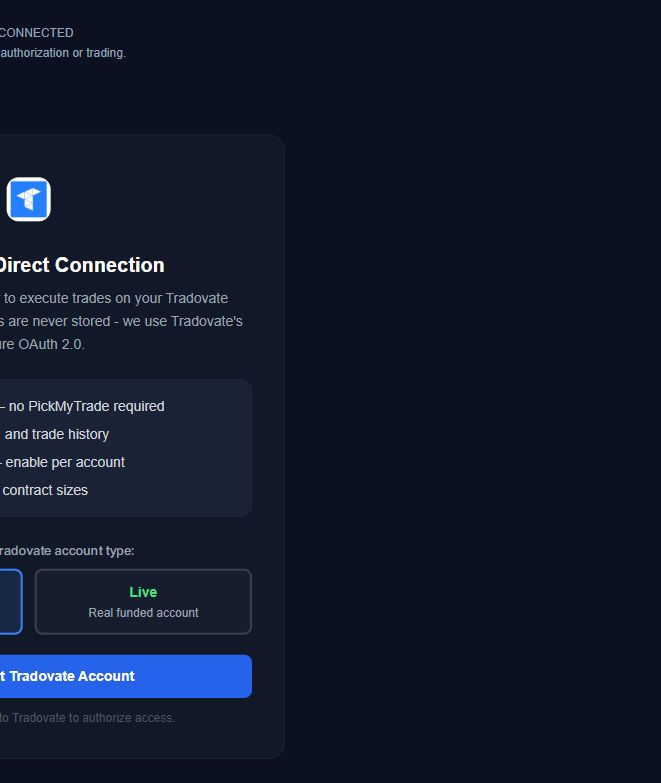
The screen identifies Tradovate Direct Connection. This is the AutoTrader execution flow, not the separate reporting connection used by Trading Journal and Prop Guard.
Demo is selected in this preview. Use the environment assigned to your specific account. A prop account described as funded may still be simulated; that label alone does not determine Demo versus Live.
Authorization is only one step. After returning from the broker, compare the account identifier, strategy, market, contract count, and enabled state with your intended setup. No broker connection or trading was performed for this screenshot.
Use the current AutoTrader page to confirm supported connections and available plans, then follow the dashboard's provider-specific setup. Keep this checklist beside the process; no account connection or trading is required to read it.
Published by Elev8+ Trading to explain trading concepts and our products. Elev8 sells the tools linked here; these guides are not independent product rankings or personalized financial advice. Chart examples illustrate a process, not audited trading results.
Dates identify substantive content updates, not a claim of independent expert review. Check current exchange, broker, and prop-firm rules before relying on a calculation. Ask a question or report a correction.
Next Step
Review the strategies, supported connections, and current plans. If you are still comparing options, get the free five-email explanation first; it does not activate software or start a paid trial.
Treat authentication, configuration, execution, and reconciliation as separate checks.
Test the supported workflow without assuming simulation predicts live results.