
How to Build a Futures TradingView Indicator Setup →
Give each indicator a clear role: reading the market, marking levels, or identifying a possible entry. Remove tools that repeat information without improving your plan.
Indicators Playbook
Understand what different indicators show and where their limits are. Explore NQ, ES, and gold examples, then see how the Elev8+ tools work on a chart.
Guides In Hub
23
Step-by-step guides to help you prepare, practice, and review.
Best Use
Using indicators to plan trades
Start with the topic you need, then follow the related guides.
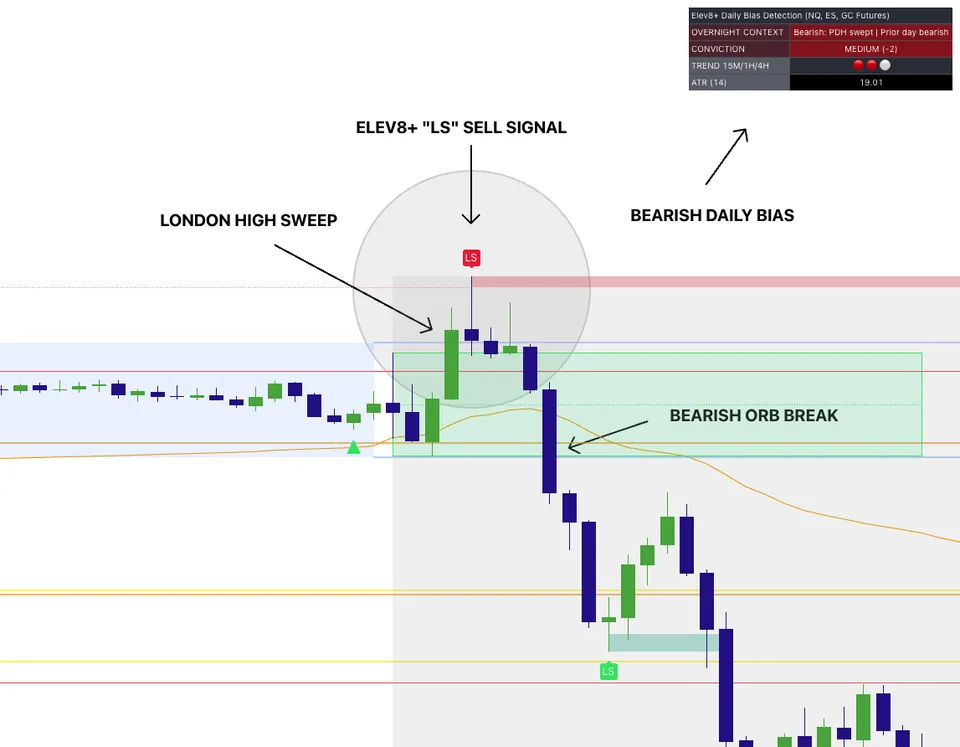
Multi-indicator confluence chart for futures execution.
Start Here
Watch the indicator demo to see the tools on a chart, then use these guides to understand the signals.
Free resource · No purchase required
Get seven short indicator lessons by email. Work through market context, important levels, possible entries, and risk planning without adding another unexplained signal to your chart.
Get the free indicator lessonsFree email lessons, not a software trial. No purchase required. Unsubscribe anytime. Privacy policy.
Suggested Learning Path
Give each indicator a clear role: reading the market, marking levels, or identifying a possible entry. Remove tools that repeat information without improving your plan.
A sweep indicator flags moves through prior highs or lows. Check whether price returns through the level or continues beyond it before interpreting the signal.
A fair value gap describes a three-candle price imbalance. Learn how to review its location and later price reaction without assuming the gap must fill.
Guides
1 / 23
NQ IndicatorsThe best NQ indicator setup for your workflow answers distinct questions: where price is, which level matters, and whether your setup has formed. Start with those questions, not a screen full of signals.
2 / 23
MNQ IndicatorMNQ indicators help you review Nasdaq futures price action. Keep the chart analysis separate from the contract-size calculation and your account's risk limits.
3 / 23
ES IndicatorsBuild an ES chart around a few clear jobs: identify market direction, mark levels, and review possible entries. Decide how each indicator contributes before adding it.
4 / 23
ES Opening RangeAn opening range marks the high and low of a chosen opening period. Learn to assess a break of that range without treating every move outside it as an entry.
5 / 23
ES InternalsMarket internals describe activity beneath an index's price move, such as stock participation. Compare that information with ES levels rather than using it alone.
6 / 23
Gold IndicatorsUse GC indicators to study direction, price levels, and possible setups. Test the settings on gold futures and calculate risk using the contract you actually trade.
7 / 23
Futures IndicatorsGive each indicator a clear role: reading the market, marking levels, or identifying a possible entry. Remove tools that repeat information without improving your plan.
8 / 23
Sweep IndicatorA sweep indicator flags moves through prior highs or lows. Check whether price returns through the level or continues beyond it before interpreting the signal.
9 / 23
Reversal IndicatorThere is no reversal indicator that works in every market. Compare what triggers the signal, when it appears, and how it behaves during a strong trend.
10 / 23
ICT IndicatorsLiquidity sweeps, fair value gaps, and order blocks describe different chart patterns. Define the pattern and test a repeatable entry and exit rule for each one.
11 / 23
FVG IndicatorA fair value gap describes a three-candle price imbalance. Learn how to review its location and later price reaction without assuming the gap must fill.
12 / 23
Order Block IndicatorAn order-block indicator highlights zones using a defined price pattern. Treat those zones as areas to investigate, not proof of institutional orders or guaranteed support.
13 / 23
Exhaustion IndicatorExhaustion indicators flag conditions that may suggest a move is stretched or slowing. A warning is a reason to review price action, not an automatic reversal trade.
14 / 23
NQ OverextensionAn overextension reading means price has moved far from a reference such as an average or band. It does not tell you when the trend will end.
15 / 23
Futures ReversalA possible reversal is not a confirmed change in direction. Combine the signal with a price level, an entry condition, and an exit plan before considering a trade.
16 / 23
Elev8+ product guideLearn how Elev8+ Pro connects key levels, liquidity sweeps, and confirmation markers—and why a location alert is not automatically a trade entry.
17 / 23
Elev8+ product guideSee how Elev8+ Market Map organizes session highs and lows, previous-day levels, and opening ranges so you can plan locations before looking for an entry.
18 / 23
Elev8+ product guideUnderstand how Elev8+ Market Extremes frames exhaustion and trend conditions, and why a stretched market still needs price confirmation before a reversal idea.
19 / 23
Elev8+ product guideLearn how Elev8+ VWAP Deviation shows distance from volume-weighted average price, and how to distinguish a possible return toward value from continued extension.
20 / 23
Elev8+ product guideUnderstand how Elev8+ Reversal Blocks marks confirmed reaction zones and their midpoints, and how to study a retest without assuming the zone will hold.
21 / 23
Elev8+ product guideLearn how Elev8+ Real FVG connects a fair value gap to a strong move and a break of a prior swing, then uses that area to frame possible pullback entries.
22 / 23
Elev8+ product guideExplore how Elev8+ Momentum Gaps maps imbalances, impulse zones, and order-block context, and how its broader view differs from Real FVG.
23 / 23
Elev8+ product guideCompare the roles of Elev8+ Pro, Market Map, Market Extremes, VWAP Deviation, Reversal Blocks, Real FVG, and Momentum Gaps before building your chart.
Next Step
Watch the indicator walkthrough to see the tools on a chart. If you want more help before choosing a plan, get the free indicator lessons by email.
Practical lessons by email
Indicator examples and walkthroughs
See the tools on a chart before choosing a plan.
Practical lessons by email. No purchase required.