The Problem This Guide Helps You Solve
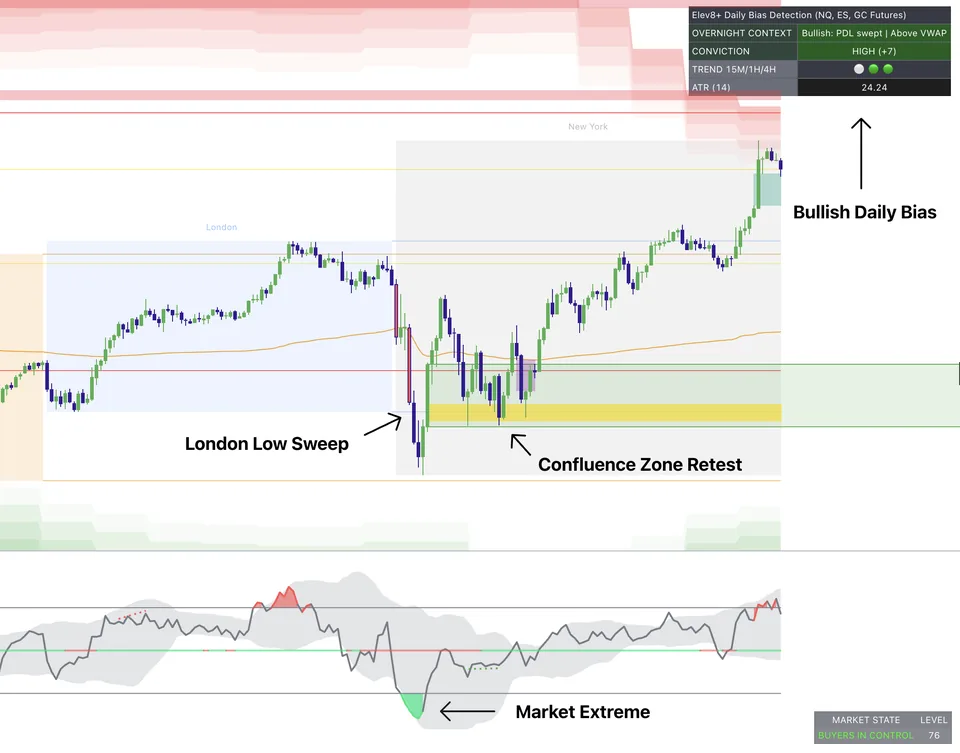
An ES signal means little without knowing where it appears. Review nearby levels and market direction before interpreting the indicator.
ES Indicator Process
Work through these checks in order. The examples explain a process; they are not instructions to place a trade.
1. Session Profile
Determine whether ES is opening in balance or expansion.
2. Level + Confluence
Use indicators near key level interactions, not in random mid-range.
3. Execution Filter
Take only setups that pass confirmation and risk checks.
ES Use Cases
Balanced Mean Reversion
Signals align around value extremes for controlled rotation entries.
Value Escape Continuation
Trend continuation is favored after clear acceptance outside value.
Common Execution Mistakes To Avoid
-
Ignoring opening location relative to value.
-
Taking momentum triggers inside dead ranges.
-
Switching setups after a missed move.
Use the Elev8+ walkthrough to review how the indicators display levels and signals. Check the market, timeframe, and settings you intend to use for ES.
Related Guides
-
The Elev8+ Indicator Suite: What Each Tool Does
Compare the roles of Elev8+ Pro, Market Map, Market Extremes, VWAP Deviation, Reversal Blocks, Real FVG, and Momentum Gaps before building your chart.
-
ES Opening Range Indicators: Breakouts and Failed Breaks
An opening range marks the high and low of a chosen opening period. Learn to assess a break of that range without treating every move outside it as an entry.
-
ES Market Internals: Read Breadth Alongside Price
Market internals describe activity beneath an index's price move, such as stock participation. Compare that information with ES levels rather than using it alone.
-
How to Build a Futures TradingView Indicator Setup
Give each indicator a clear role: reading the market, marking levels, or identifying a possible entry. Remove tools that repeat information without improving your plan.
Further Reading
About this guide
Published by Elev8+ Trading to explain trading concepts and our products. Elev8 sells the tools linked here; these guides are not independent product rankings or personalized financial advice. Chart examples illustrate a process, not audited trading results.
Dates identify substantive content updates, not a claim of independent expert review. Check current exchange, broker, and prop-firm rules before relying on a calculation. Ask a question or report a correction.