The Problem This Guide Helps You Solve
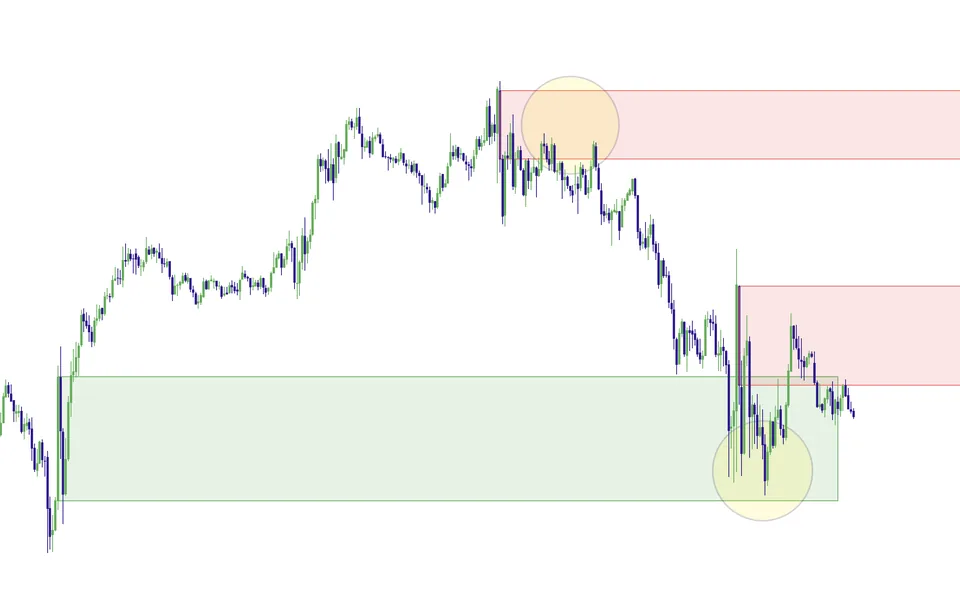
Momentum Gaps adds broader imbalance, impulse-zone, and order-block mapping to the indicator workflow. Its job is to organize potential areas of interest after strong moves. Real FVG has a more specific structure-qualified gap role; the two names should not be treated as interchangeable descriptions of the same tool.
How to use this in your workflow
Work through these checks in order. The examples explain a process; they are not instructions to place a trade.
Start with the move that created the area
Inspect the displacement or impulse before focusing on the shaded region. Describe where price came from, which nearby structure matters, and whether the move fits your session plan. A zone without that context is easy to overinterpret.
Choose the relevant mapping layers
Review the available settings and display only the information you can explain. Imbalance, impulse-zone, and order-block references answer related but different questions. More overlapping drawings do not automatically provide independent confirmation.
Use a revisit as an observation point
If price returns to a mapped area, compare its behavior with a nearby session level and your confirmation rules. Decide what a failed reaction would look like before entering. Use the trade review to check the original reasoning rather than keeping only attractive screenshots.
Examples and limits
A hypothetical chart-reading example
An impulse creates an area you want to watch on a pullback. If the area overlaps a level already in your plan, examine the reaction there. The overlap helps organize the observation; it does not establish that two independent systems have guaranteed the trade.
What this tool cannot tell you
Mapped imbalances are not orders waiting to be filled, and they do not guarantee that price will return. Several tools may reflect the same underlying price move, so apparent agreement can overstate the amount of independent evidence.
Common Execution Mistakes To Avoid
-
Treating a historical example as a promised future outcome.
-
Adding a tool without understanding which decision it supports.
See where Momentum Gaps fits into the Elev8+ workflow, then compare the current indicator plans on the suite page. Start with the free lessons if you want more explanation before deciding.
Related Guides
-
The Elev8+ Indicator Suite: What Each Tool Does
Compare the roles of Elev8+ Pro, Market Map, Market Extremes, VWAP Deviation, Reversal Blocks, Real FVG, and Momentum Gaps before building your chart.
-
Real FVG: Structure Breaks and Gap Retests
Learn how Elev8+ Real FVG connects a fair value gap to a strong move and a break of a prior swing, then uses that area to frame possible pullback entries.
-
TradingView Order Blocks: Zones, Retests and Limits
An order-block indicator highlights zones using a defined price pattern. Treat those zones as areas to investigate, not proof of institutional orders or guaranteed support.
Further Reading
About this guide
Published by Elev8+ Trading to explain trading concepts and our products. Elev8 sells the tools linked here; these guides are not independent product rankings or personalized financial advice. Chart examples illustrate a process, not audited trading results.
Dates identify substantive content updates, not a claim of independent expert review. Check current exchange, broker, and prop-firm rules before relying on a calculation. Ask a question or report a correction.