The Problem This Guide Helps You Solve
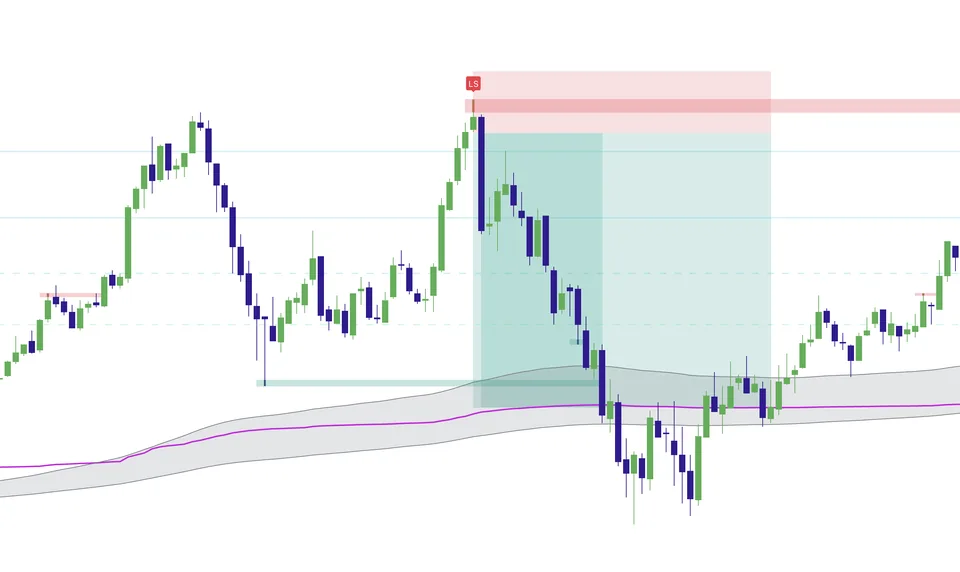
Elev8+ Pro highlights reactions around important levels and candles that meet its confirmation rules. Its role is to help you study execution conditions after you have chosen a location, rather than treating every marker on the chart as an independent instruction.
How to use this in your workflow
Work through these checks in order. The examples explain a process; they are not instructions to place a trade.
Locate the setup first
Mark the level you intended to watch before looking for a signal. A sweep is a move beyond a reference level; by itself it does not tell you whether price will continue or return. Compare the move with the surrounding session structure.
Separate location from confirmation
Use the chart legend to distinguish level markings, sweep behavior, and confirmation markers. A marker appearing near your level gives you information to compare with your entry rules. Do not assume different symbols have identical meaning or timing.
Define the failed idea
Before an entry, decide which price action would contradict the setup and how that relates to your stop and position size. Review the actual chart sequence afterward, including the signals that did not lead to a successful reversal.
Examples and limits
A hypothetical chart-reading example
Suppose price briefly trades above a prior high and then returns below it. You would first inspect that location and the failure to hold above it, then check for the relevant confirmation. If price instead holds beyond the high, the same reversal idea is no longer supported just because a sweep occurred.
What this tool cannot tell you
Confirmation is not certainty. A qualified marker can precede a losing trade, and a historical chart should not be used to assume you would have obtained a particular fill.
Common Execution Mistakes To Avoid
-
Treating a historical example as a promised future outcome.
-
Adding a tool without understanding which decision it supports.
See where Elev8+ Pro fits into the Elev8+ workflow, then compare the current indicator plans on the suite page. Start with the free lessons if you want more explanation before deciding.
Related Guides
-
The Elev8+ Indicator Suite: What Each Tool Does
Compare the roles of Elev8+ Pro, Market Map, Market Extremes, VWAP Deviation, Reversal Blocks, Real FVG, and Momentum Gaps before building your chart.
-
TradingView Liquidity Sweeps: Read the Signal in Context
A sweep indicator flags moves through prior highs or lows. Check whether price returns through the level or continues beyond it before interpreting the signal.
-
Market Map: Session Levels and Opening Ranges
See how Elev8+ Market Map organizes session highs and lows, previous-day levels, and opening ranges so you can plan locations before looking for an entry.
Further Reading
About this guide
Published by Elev8+ Trading to explain trading concepts and our products. Elev8 sells the tools linked here; these guides are not independent product rankings or personalized financial advice. Chart examples illustrate a process, not audited trading results.
Dates identify substantive content updates, not a claim of independent expert review. Check current exchange, broker, and prop-firm rules before relying on a calculation. Ask a question or report a correction.