The best NQ indicator setup for your workflow answers distinct questions: where price is, which level matters, and whether your setup has formed. Start with those questions, not a screen full of signals.
By Elev8+ Trading · Educational guide · 3 min read · Updated
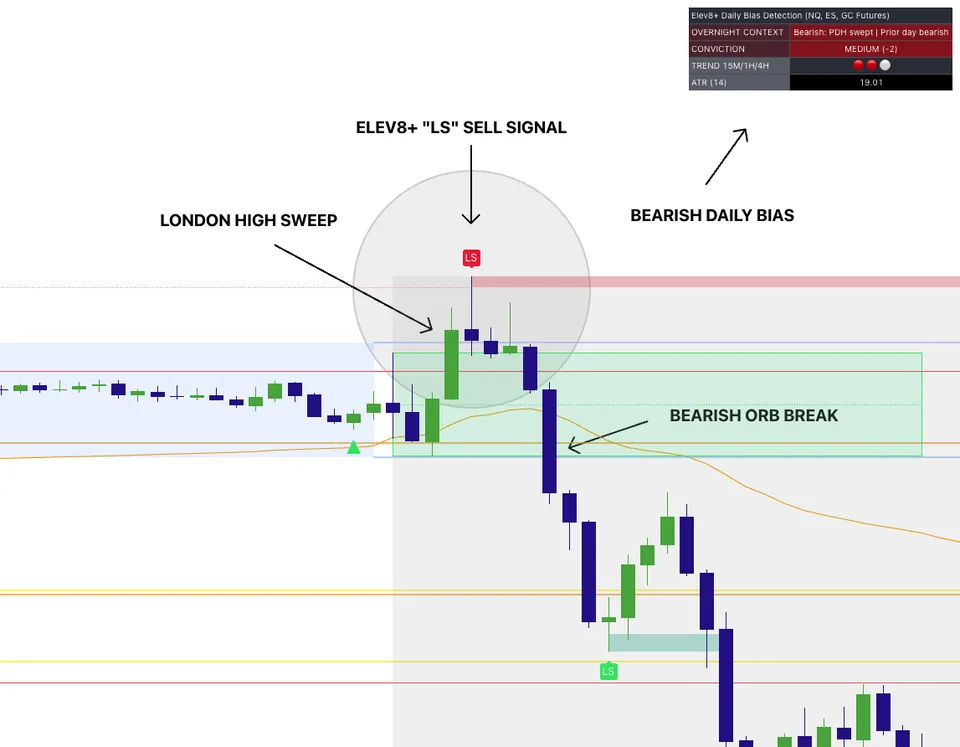
Multi-indicator confluence chart for futures execution.
What You Will Learn
Start with these essentials
Use one context layer and one trigger layer.
Map levels before signal scanning.
Keep setup labels consistent in your journal.
Who This Is For
Traders using TradingView who want confluence and structure, not single-signal guessing.
Indicator users who need a repeatable setup checklist they can journal.
Futures traders learning to connect market conditions, price levels, and entry rules.
Before You Use This Guide
Indicators do not remove the need to manage risk.
Signals still need to be checked against price levels and market conditions.
The Problem This Guide Helps You Solve
Three indicators reacting to the same price move are not necessarily three independent confirmations. Begin with the decision you need to make, then choose a tool that makes the relevant information easier to see. Elev8 publishes this guide and sells the indicators described here; this is a walkthrough of our approach, not an independent ranking of every TradingView product.
Build an NQ chart with a purpose for each tool
Work through these checks in order. The examples explain a process; they are not instructions to place a trade.
1. Organize the price references
Start with session levels and zones you can explain. Elev8 Market Map organizes support, resistance, and prior-session references; Pro combines several chart tools. Know which session a level belongs to. A visible level is a place to observe price, not an instruction to trade when it is touched.
2. Add context without duplicating it
VWAP Deviation shows price relative to VWAP and deviation bands. Market Extremes highlights stretched conditions. These help frame location, but neither proves that a move must reverse. A strong trend can stay extended. Read their separate explainers before treating them as interchangeable filters.
3. Inspect the actual setup sequence
A liquidity-sweep marker, Real FVG zone, Reversal Block, or Momentum Gap describes a different observation. Choose the pattern your plan calls for, then check the price action that created it. Several labels in one area do not guarantee a fill, target, or higher win rate.
4. Test the workflow and keep the failures
Use TradingView practice tools where available to review entries you would take, entries you would skip, and setups that lose. Record the session, settings, stop distance, and reason for the decision. Historical chart examples do not establish live performance, and a signal does not choose an affordable position size.
NQ Setup Examples
Levels plus a sweep, but no rejection
Price trades beyond a prior high and stays above it. Your level tool did its job by showing the reference, but a reversal plan still needs its rejection or reclaim condition. The correct outcome can be no trade; repeatedly fading the move changes the strategy.
VWAP extension is context, not a timer
Price reaches an outer band during a persistent trend. That identifies distance from VWAP, not the exact moment buyers or sellers are exhausted. If your reversal confirmation does not occur, the band alone is not a complete setup.
What the Pro chart example actually shows
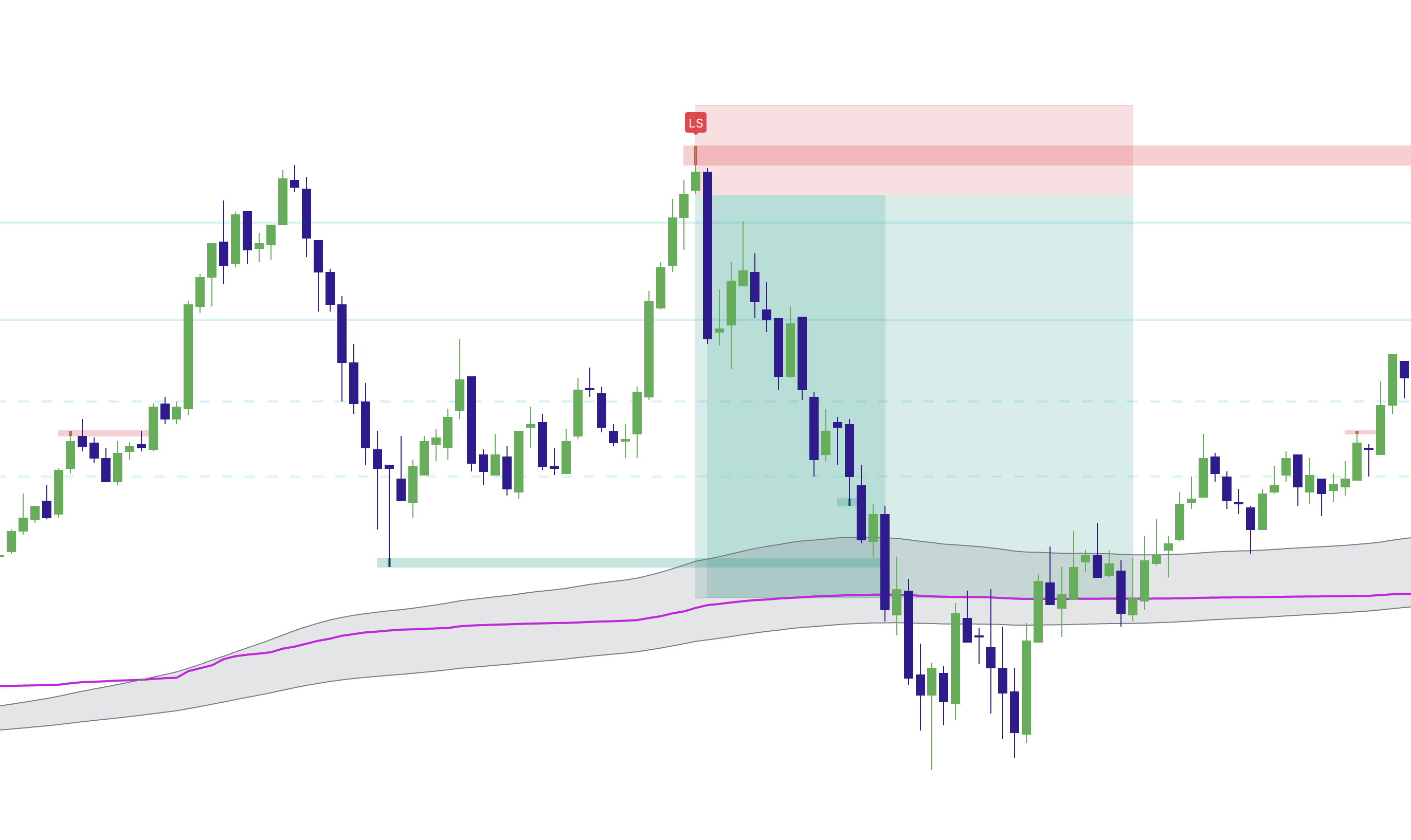
Existing product chart illustration. The shaded trade area is not an audited fill record or evidence of a particular win rate. Open the image for a full-size view.
Left-hand high: the reference
The earlier peak supplies context for the later test. Identify the reference before evaluating the later marker.
LS marker: inspect the sequence
The marked move crosses the prior high and is followed by a decline. Study the price sequence, not just the presence of the label.
Shaded area: distinguish illustration from execution
An illustrated entry, stop, or target does not establish the prices a real account could have filled. Include failed examples in your review as well.
Common Execution Mistakes To Avoid
Adding indicators after every losing trade.
Using identical signal logic in all regimes.
Ignoring session location at entry.
How Elev8 helps with NQ indicator execution
Watch the Elev8+ demo to see the indicators on an NQ chart. Compare the role of each signal with your existing entry and exit rules before choosing a subscription.
The Elev8+ Indicator Suite: What Each Tool Does
Compare the roles of Elev8+ Pro, Market Map, Market Extremes, VWAP Deviation, Reversal Blocks, Real FVG, and Momentum Gaps before building your chart.
TradingView Indicators for MNQ: Signals and Sizing
MNQ indicators help you review Nasdaq futures price action. Keep the chart analysis separate from the contract-size calculation and your account's risk limits.
MNQ Risk Calculator: Estimate Your Contract Size
Calculate MNQ contract size from stop distance, dollar risk, and estimated costs. Work through sizing examples and see why a prop account balance is not its risk budget.
Published by Elev8+ Trading to explain trading concepts and our products. Elev8 sells the tools linked here; these guides are not independent product rankings or personalized financial advice. Chart examples illustrate a process, not audited trading results.
Dates identify substantive content updates, not a claim of independent expert review. Check current exchange, broker, and prop-firm rules before relying on a calculation. Ask a question or report a correction.
Next Step
Want to learn how these indicators work together?
Watch the indicator demo to see the tools used together. For more guidance before choosing a plan, get the free indicator lessons by email.