Who This Is For
- Traders who want one practical daily workflow for context, bias, and setup selection.
- Anyone reducing tool overload and standardizing morning prep.
- Traders who want a preparation checklist rather than a prediction.
NQ Command Center
A market-internals dashboard helps you compare index price with the stocks behind it. Look for agreement or disagreement, then check what is happening at key levels.
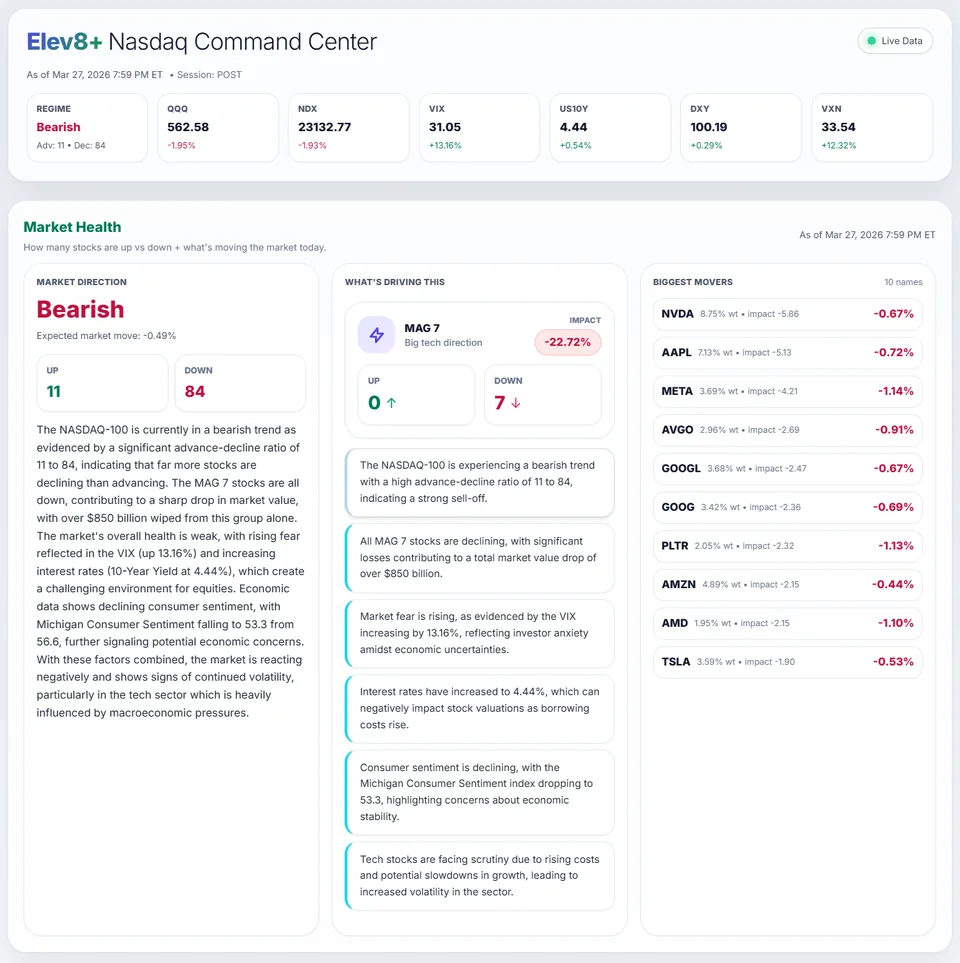
Market Health command center showing NQ context, levels, and bias.
What You Will Learn
Market-internals data needs interpretation. Compare stock participation with index price, and record whether the two agree before choosing a setup to watch.
Work through these checks in order. The examples explain a process; they are not instructions to place a trade.
Classify breadth as supportive, mixed, or divergent before the open.
Define two-sided scenarios tied to level interaction and internals context.
Allow only setups that match both structure and internals quality.
Context supports directional continuation frameworks with cleaner conviction.
Mixed signals reduce activity and push toward selective or stand-down decisions.
Explore Market Health to review Nasdaq participation and market conditions together. Compare that overview with your chart before drawing a conclusion.
Want to see analysis on your chart? Watch the Elev8+ indicator walkthrough to compare the separate TradingView subscription.
Published by Elev8+ Trading to explain trading concepts and our products. Elev8 sells the tools linked here; these guides are not independent product rankings or personalized financial advice. Chart examples illustrate a process, not audited trading results.
Dates identify substantive content updates, not a claim of independent expert review. Check current exchange, broker, and prop-firm rules before relying on a calculation. Ask a question or report a correction.
Next Step
Review conditions in Market Health, then use the free email course to learn about price levels, entry signals, and risk planning.
Daily context and level mapping
Lessons on planning and reviewing trades