Who This Is For
- NQ traders building a preparation routine before the open.
- Traders learning to connect price levels with written entry rules.
- Anyone reviewing trades against a consistent checklist.
Free NQ Dashboard
Use an NQ dashboard to review market direction, important price levels, and Nasdaq stock participation before you plan a trade.
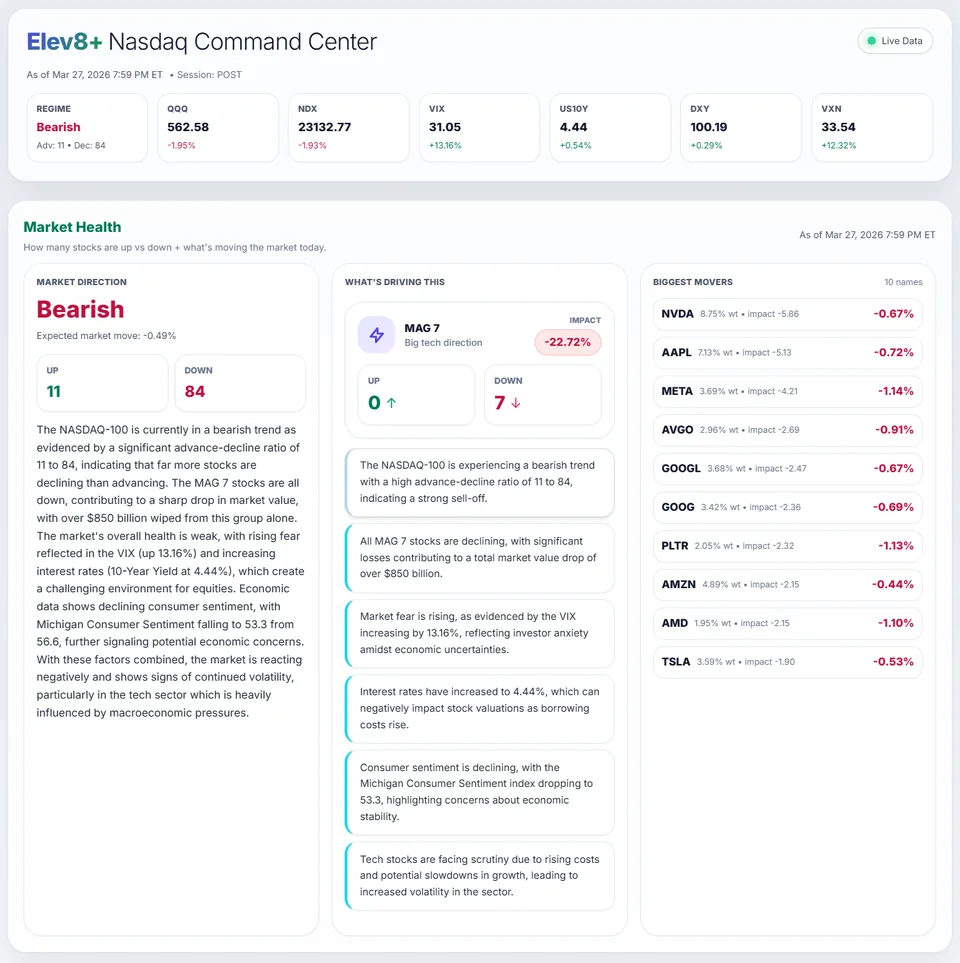
Market Health command center showing NQ context, levels, and bias.
What You Will Learn
Checking several disconnected tools can make preparation harder. A dashboard brings market conditions and key levels together before you decide whether to trade.
Work through these checks in order. The examples explain a process; they are not instructions to place a trade.
Check whether price is moving mostly sideways, trending in one direction, or changing between the two.
Mark the previous-day and overnight highs and lows, then note the volume-weighted average price (VWAP).
Write down the price behavior you need before entering, along with the condition that would rule out the idea.
Wait for sweep-reclaim confirmation instead of first impulse entries.
Use pullback continuation logic when context supports directional flow.
Market Health brings market conditions and key session levels together. Use that overview to prepare your plan before the open.
Want to see analysis on your chart? Watch the Elev8+ indicator walkthrough to compare the separate TradingView subscription.
Published by Elev8+ Trading to explain trading concepts and our products. Elev8 sells the tools linked here; these guides are not independent product rankings or personalized financial advice. Chart examples illustrate a process, not audited trading results.
Dates identify substantive content updates, not a claim of independent expert review. Check current exchange, broker, and prop-firm rules before relying on a calculation. Ask a question or report a correction.
Next Step
Use Market Health for session preparation and the free email course to learn how to read levels, signals, and potential exits.
Daily levels and context from Market Health
Free lessons on chart analysis and risk