Who This Is For
- Traders who want one practical daily workflow for context, bias, and setup selection.
- Anyone reducing tool overload and standardizing morning prep.
- Traders who want a preparation checklist rather than a prediction.
NQ Heatmap Indicator
Use a Nasdaq heatmap to see which stocks are moving and whether the move is broad or concentrated. Then compare that context with NQ—not with an automatic buy or sell rule.
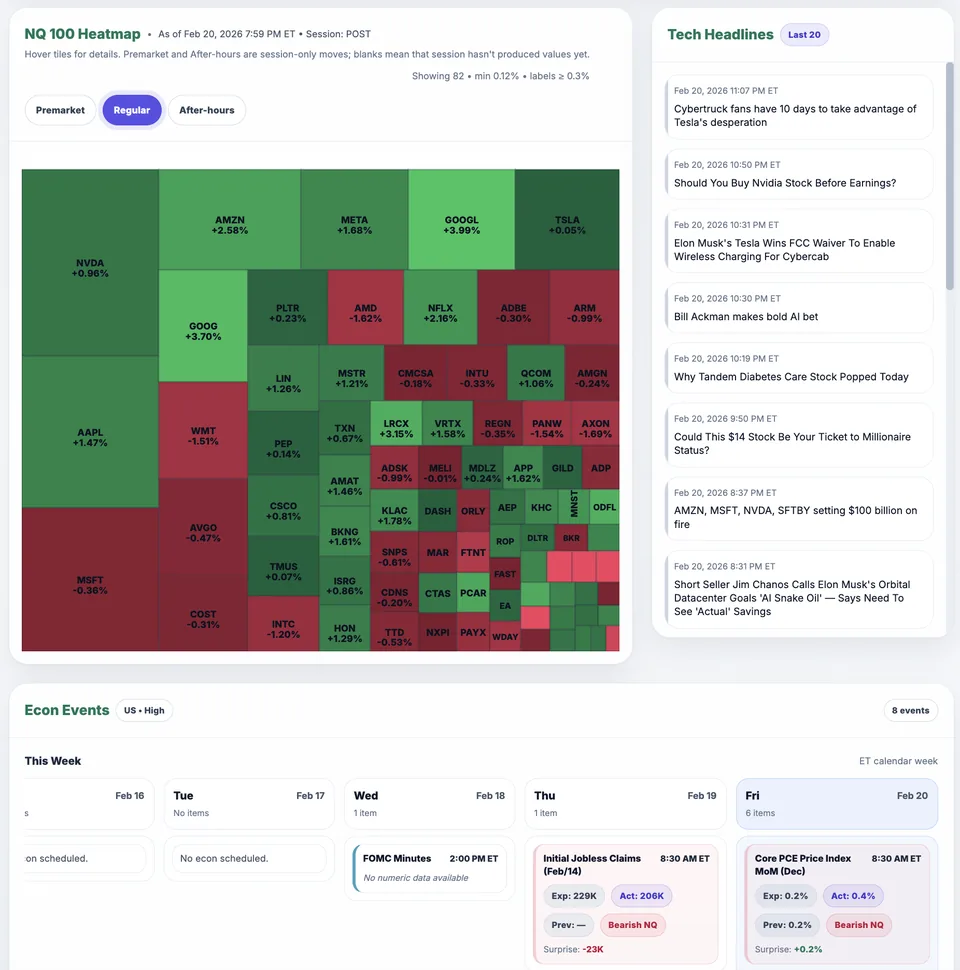
Nasdaq heatmap panel showing breadth and leadership pressure.
What You Will Learn
Green or red squares do not tell the whole story. Look at which stocks are moving, how broadly they agree, and whether NQ price confirms that picture.
Work through these checks in order. The examples explain a process; they are not instructions to place a trade.
Read the legend and the period used for percentage changes. A green tile normally means a positive change over that comparison period, not that the stock is rising on the last candle. Confirm the timestamp and session before comparing it with your futures chart.
Count-based breadth asks how many tracked stocks are up or down. Leadership asks which larger constituents are contributing to the index move. Do not assume tile area always means index weight; check the tool's legend. One large leader and many small decliners can coexist.
Move back to your NQ chart and the prior-day or overnight references in your plan. If participation looks positive but price cannot hold above your selected level, you have mixed evidence. The heatmap helps describe the session; it does not overrule the price sequence.
Save the time, session, participation, and price location you observed. After the session, review whether your entry conditions occurred. This is more useful than recording that the heatmap was green, because it preserves the context in which you made the decision.
Suppose several large Nasdaq constituents are higher while more tracked stocks are down than up. A weighted index can still rise. The useful observation is narrow leadership, not that the heatmap or futures chart must be broken. Neither observation guarantees what price does next.
Stocks may remain above yesterday's close while falling from an intraday high. Their tiles can stay green during that pullback. Compare the same time horizon before calling the readings contradictory, and wait for your own setup confirmation.
Review Nasdaq stock participation in Market Health, then compare it with the futures chart. The dashboard helps you gather information; it does not decide your entry.
Published by Elev8+ Trading to explain trading concepts and our products. Elev8 sells the tools linked here; these guides are not independent product rankings or personalized financial advice. Chart examples illustrate a process, not audited trading results.
Dates identify substantive content updates, not a claim of independent expert review. Check current exchange, broker, and prop-firm rules before relying on a calculation. Ask a question or report a correction.
Next Step
Review conditions in Market Health, then use the free email course to learn about price levels, entry signals, and risk planning.
Daily context and level mapping
Lessons on planning and reviewing trades