
Who This Is For
- Traders preparing to connect and test an automated strategy.
- Traders comparing supported accounts, setup requirements, and monitoring tools.
- Traders learning what they need to monitor after connecting.
TradingView Bot Workflow
A TradingView alert is a message, not a broker order. Learn the separate steps that turn a signal into an order and why each step needs testing.
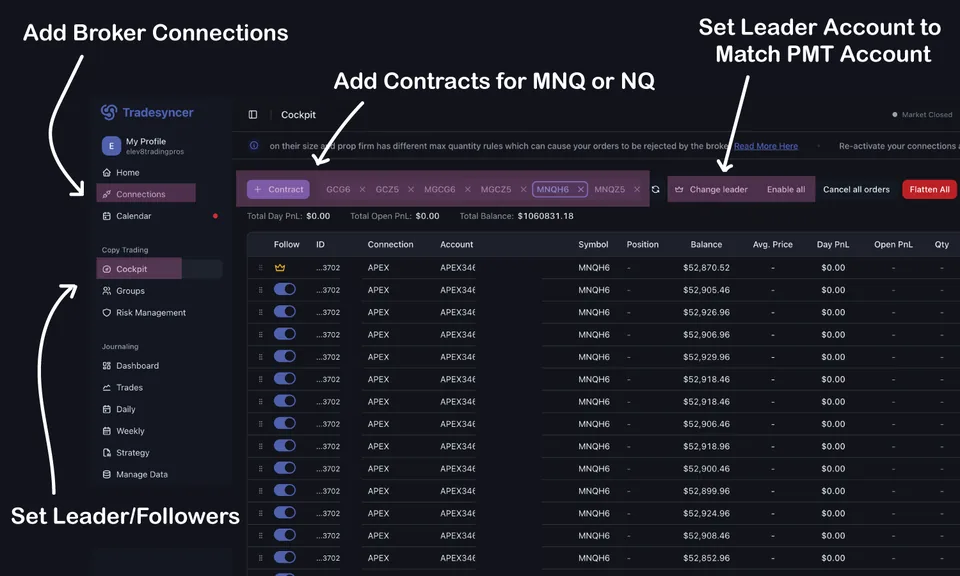
Signal-to-execution workflow view for TradingView automation.
What You Will Learn
A signal can be correct while the message, order, or exit fails. Review each stage separately and check the final position with the broker.
Work through these checks in order. The examples explain a process; they are not instructions to place a trade.
Define TradingView signal rules and check that alerts use the correct symbol, settings, and message format.
Apply market context and setup eligibility checks before execution.
Route orders through controlled risk and operational safeguards.
Signal fires, context filter passes, and order executes within risk constraints.
Signal fires, context fails, and workflow blocks execution safely.
Elev8+ AutoTrader runs predefined strategies through a supported account connection. Review its strategy and setup requirements; do not assume it can automate any TradingView indicator.
for a closer look before deciding. The guide is free; the software is a separate subscription.
Published by Elev8+ Trading to explain trading concepts and our products. Elev8 sells the tools linked here; these guides are not independent product rankings or personalized financial advice. Chart examples illustrate a process, not audited trading results.
Dates identify substantive content updates, not a claim of independent expert review. Check current exchange, broker, and prop-firm rules before relying on a calculation. Ask a question or report a correction.
Next Step
Check AutoTrader account requirements and setup steps. Use Market Health separately to review current market conditions.
Account connection and setup checklist
Risk checks before increasing contract count