
Who This Is For
- Traders comparing micro Nasdaq automation with NQ execution.
- Readers preparing a concrete account, sizing, and monitoring checklist.
Futures automation guide
Learn how an MNQ trading bot works, compare micro and E-mini contract risk, and check Tradovate setup, costs, and monitoring before enabling automation.

Broker connection illustration, not a connected account or a trading result.
What You Will Learn
An MNQ trading bot applies a strategy to Micro E-mini Nasdaq-100 futures. Choosing a smaller contract changes the dollars gained or lost per point; it does not improve the strategy or remove execution risk. This guide helps you connect three decisions that are often considered separately: what the bot trades, how much exposure you select, and how you check the account while it runs. Elev8 supports MNQ through eligible connections, but not every account permits automation.
Work through these checks in order. The examples explain a process; they are not instructions to place a trade.
Elev8 offers two built-in choices. AutoTrader evaluates previous-day and overnight context for a qualified New York-session trade. Hybrid Trader waits for the session to begin and looks for qualifying continuation or reversal setups. Either can stay out when its conditions are absent. Selecting MNQ changes the execution contract. It does not guarantee a daily trade or let you replace the built-in rules with your own strategy.
One MNQ is $2 per index point; one NQ is $20. Both outright contracts move in 0.25-point ticks. Work from your own loss budget, the strategy's stop behavior, estimated costs, and account restrictions. The calculator linked below is a separate planning tool: it does not change AutoTrader settings or let you override the built-in stop rules.
For an MNQ trading bot on Tradovate, start in the AutoTrader dashboard and follow its direct authorization flow. Confirm the provider's Demo or Live environment and the exact account returned. Then select MNQ, your strategy, and the contract count. A Trading Journal connection is not an AutoTrader trading authorization. Other supported providers have their own connection steps; check the current product page.
Where your account supports simulation, observe a qualifying order, its protective stop, and the exit. Compare the dashboard with broker positions and working orders. Do not force a manual trade just because a correctly configured bot skips a session. Know how to stop new entries and separately check whether an existing position or order still needs attention.
| Contract detail | MNQ | NQ |
|---|---|---|
| Contract | Micro E-mini Nasdaq-100 | E-mini Nasdaq-100 |
| Dollar value per point | $2 | $20 |
| Outright minimum tick | 0.25 points / $0.50 | 0.25 points / $5 |
| 30-point move, one contract | $60 before costs | $600 before costs |
Contract specifications are sourced from CME below. The dollar examples are hypothetical and exclude costs. These figures are not current margin requirements or recommended position sizes.
Suppose a hypothetical strategy has a 30-point planned stop and you choose a $200 trade-risk budget. One MNQ represents $60 before costs. With a $5 per-contract allowance for round-trip fees and slippage, the estimate is $65 each: three contracts total $195 and four total $260. One NQ would be $600 before costs. These are arithmetic inputs, not a recommended budget, a broker fee quote, or a prediction of AutoTrader's stop distance.
If the same example had only a $50 budget, one MNQ at an estimated $65 would not fit. The calculation should return zero. Raising the budget or assuming a tighter stop just to make an order possible changes the plan. Margin, nominal prop-account size, and remaining drawdown are separate constraints—not interchangeable measures of affordable loss.
A qualifying entry can still reach its protective stop. With three MNQ, the example's planned 30-point move against the position is $180 before costs. An adverse fill can increase the realized loss beyond the estimate. Automated stop submission is not a guaranteed maximum loss, and a profitable backtest cannot establish the fill your account will receive.
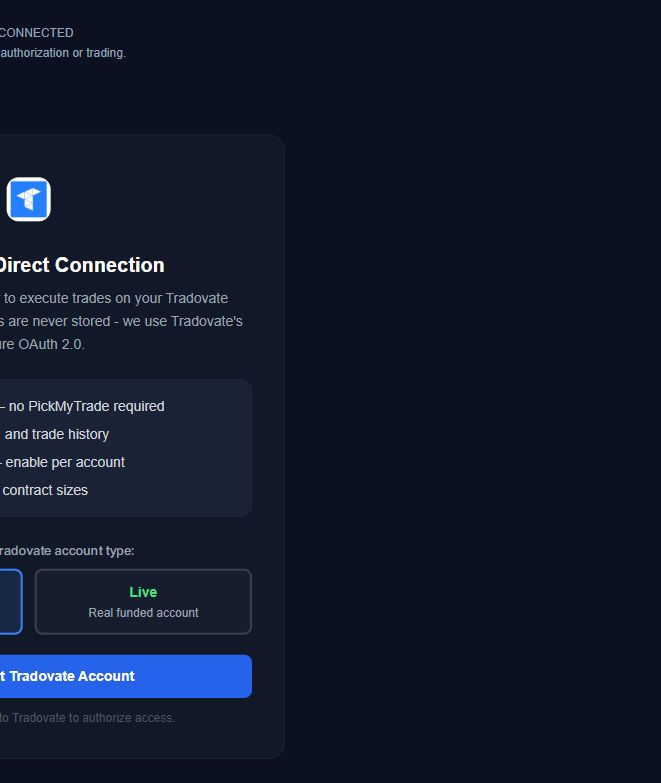
The screen identifies Tradovate Direct Connection. This is the AutoTrader execution flow, not the separate reporting connection used by Trading Journal and Prop Guard.
Demo is selected in this preview. Use the environment assigned to your specific account. A prop account described as funded may still be simulated; that label alone does not determine Demo versus Live.
Authorization is only one step. After returning from the broker, compare the account identifier, strategy, market, contract count, and enabled state with your intended setup. No broker connection or trading was performed for this screenshot.
See AutoTrader and Hybrid Trader's current strategy explanations, supported connections, and plans. Choose a strategy and MNQ size only after understanding the limits; the free email guide is available if you want to learn before purchasing.
Published by Elev8+ Trading to explain trading concepts and our products. Elev8 sells the tools linked here; these guides are not independent product rankings or personalized financial advice. Chart examples illustrate a process, not audited trading results.
Dates identify substantive content updates, not a claim of independent expert review. Check current exchange, broker, and prop-firm rules before relying on a calculation. Ask a question or report a correction.
Next Step
Review the strategies, supported connections, and current plans. If you are still comparing options, get the free five-email explanation first; it does not activate software or start a paid trial.
MNQ uses a smaller dollar multiplier, not a safer or more profitable strategy.
Use the exact account, environment, strategy, market, and contract count you intended.