The Problem This Guide Helps You Solve
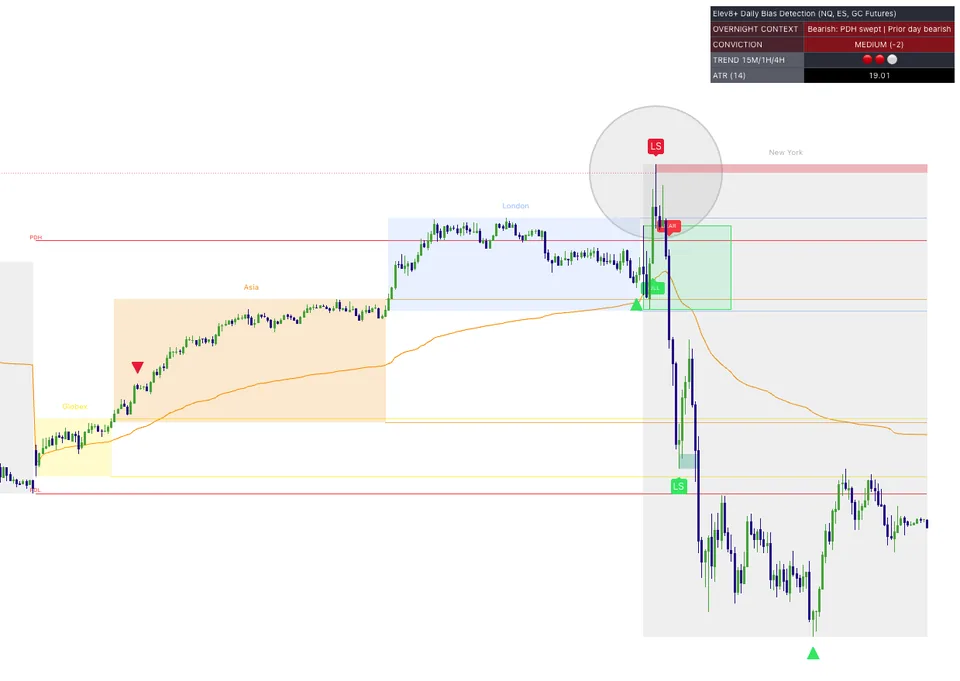
Market Map supplies location and session context. It brings reference levels into an overlay so your first question is where price is trading, not which signal flashed most recently. A mapped level is an area to observe; it is not a promise that price must reverse there.
How to use this in your workflow
Work through these checks in order. The examples explain a process; they are not instructions to place a trade.
Check your chart's session settings
Confirm the instrument and session context before comparing levels. Overnight, prior-day, and opening-range references describe different periods. A level calculated for one session should not be casually substituted for another.
Choose the references that matter today
Identify the nearby levels you will actually watch instead of assigning equal weight to every line. Write down what price holding beyond a level would mean, and what a break followed by a return would mean.
Add confirmation after location
Once price reaches a planned area, examine its response and your entry rules. Market Map answers where to look. Other analysis, such as Elev8+ Pro confirmation, can help you assess the reaction, but it does not remove the need for a stop and a size decision.
Examples and limits
A hypothetical chart-reading example
Imagine price approaches the previous day's high. A brief break followed by a return below it is different from price holding above it. The same mapped line supports two different observations; the line itself does not choose your trade direction.
What this tool cannot tell you
Levels can be crossed repeatedly or ignored during a strong move. Drawing more lines does not create stronger evidence, and an opening range is not a guaranteed boundary for the rest of the session.
Common Execution Mistakes To Avoid
-
Treating a historical example as a promised future outcome.
-
Adding a tool without understanding which decision it supports.
See where Market Map fits into the Elev8+ workflow, then compare the current indicator plans on the suite page. Start with the free lessons if you want more explanation before deciding.
Related Guides
-
The Elev8+ Indicator Suite: What Each Tool Does
Compare the roles of Elev8+ Pro, Market Map, Market Extremes, VWAP Deviation, Reversal Blocks, Real FVG, and Momentum Gaps before building your chart.
-
PDH, PDL, ONH and ONL: NQ Price Levels Explained
PDH and PDL are the previous day's high and low. ONH and ONL are the overnight high and low. Learn how traders use these reference levels.
-
ES Opening Range Indicators: Breakouts and Failed Breaks
An opening range marks the high and low of a chosen opening period. Learn to assess a break of that range without treating every move outside it as an entry.
Further Reading
About this guide
Published by Elev8+ Trading to explain trading concepts and our products. Elev8 sells the tools linked here; these guides are not independent product rankings or personalized financial advice. Chart examples illustrate a process, not audited trading results.
Dates identify substantive content updates, not a claim of independent expert review. Check current exchange, broker, and prop-firm rules before relying on a calculation. Ask a question or report a correction.